
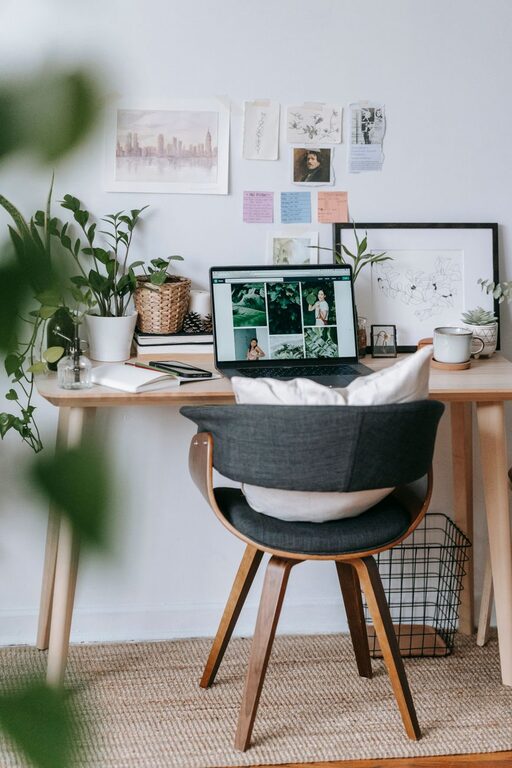
Creating a home office that feels both cozy and productive can make a significant difference in your work-from-home experience. Whether you’re working full-time from home or just need a dedicated spot for occasional tasks, combining comfort with functionality is key. Here are some practical tips to help you set up a space that encourages focus while keeping you comfortable.
1. Choose the Right Location
Pick a spot in your home that fits your work style and schedule. Ideally, find a quiet corner or room with minimal distractions. Good natural light is also a big plus since it helps keep you energized and reduces eye strain.
Consider these factors:
– Proximity to household traffic or noise
– Access to power outlets
– Availability of natural light
– Space for your desk, chair, and storage
If space is limited, even a small nook or a wall-mounted desk can work well.
2. Invest in Comfortable and Supportive Furniture
Comfort is crucial for long hours of work. An ergonomic chair that supports your back will help prevent pain and boost focus.
Furniture tips:
– Select a desk with enough surface area for your computer, notebook, and essentials
– Choose an adjustable chair with lumbar support
– Consider a standing desk or adjustable desk converter to alternate between sitting and standing
– Add a footrest if your feet don’t comfortably reach the floor
Investing in quality furniture pays off in long-term health and productivity.
3. Optimize Lighting
Good lighting balances productivity and comfort. Natural light is best, but it’s not always available.
Lighting tips:
– Position your desk near a window to take advantage of daylight
– Use adjustable task lighting like a desk lamp for focused work
– Avoid harsh overhead lighting or glare on your screen
– Choose lighting with a color temperature between 4000K and 5000K for a daytime work vibe
Proper lighting reduces eye strain and keeps you alert.
4. Keep Your Space Organized
A cluttered workspace can distract and overwhelm you. Keeping your home office tidy supports better focus and creativity.
Organization ideas:
– Use shelves, drawers, or filing cabinets to store supplies and documents
– Keep everyday items within reach, but out of view when not in use
– Use cable organizers to manage cords and chargers neatly
– Declutter regularly to maintain a clean environment
Labeling storage areas makes finding things faster and easier.
5. Personalize Your Workspace
Adding personal touches makes your home office a pleasant space where you enjoy spending time.
Personalization suggestions:
– Hang artwork or photos that inspire you
– Add plants to improve air quality and add a fresh feel
– Use soft textiles like cushions or throw blankets to increase coziness
– Choose colors for your walls and accessories that make you feel calm or motivated
These small details can help enhance your mood and creativity.
6. Create a Technology Setup That Works for You
Your technology should streamline your work, not complicate it.
Tech tips:
– Use a quality monitor that suits your work demands
– Choose a reliable internet connection to avoid disruptions
– Implement noise-canceling headphones if you work in a noisy environment
– Keep chargers and peripherals organized and accessible
– Consider a wireless keyboard or mouse to reduce cable clutter
Having the right tools helps maintain your workflow and reduces frustration.
7. Incorporate Break Areas or Relaxation Spots
Working from home often blurs the line between work and personal spaces. Designate a small area for stretching, relaxing, or short breaks.
Break area ideas:
– A comfy chair or small sofa for quick downtime
– Space for light stretching or meditation
– A shelf or basket with books, magazines, or hobbies
Taking regular breaks refreshes your mind and improves overall productivity.
8. Maintain Good Air Quality and Temperature
The environment’s air quality and temperature impact your comfort and concentration.
Tips for air and temperature:
– Open windows periodically to let fresh air circulate
– Use an air purifier if needed to reduce dust or allergens
– Maintain a comfortable room temperature—ideally between 68–72°F
– Use a fan or space heater to adjust as needed
Breathing clean air and staying comfortable help keep energy levels up.
9. Set Boundaries to Separate Work from Home Life
Especially when working at home, it’s essential to set mental and physical boundaries.
Boundary ideas:
– Use room dividers or curtains if your office is in a shared space
– Set specific working hours and communicate them to family or roommates
– Avoid work-related tasks outside your designated office space, if possible
– Use signals like closing a door or turning on a desk lamp to indicate work mode
These steps help maintain balance and reduce distractions.
Conclusion
Designing a cozy and productive home office is all about balancing comfort, functionality, and personal style. With intentional choices for location, furniture, lighting, and organization, you can create a space that not only supports your work but also enhances your well-being. Remember, a well-designed home office encourages focus, reduces stress, and makes your workday more enjoyable. Start small by adjusting one or two elements, and gradually build the perfect retreat for remote productivity.